Mastodon
  • 什么是 Mastodon?
  • 使用 Mastodon
    • 注册帐户
    • 设置你的个人资料
    • 在你的账户发布内容
    • 使用网络功能
    • 处理不想看到的内容
    • 推广你和他人
    • 进行偏好设置
    • 更多设置
    • 在站点外使用 Mastodon
    • 迁移或离开账户
    • 运行你自己的站点
  • 运营 Mastodon
    • 准备你的服务器
    • 从源代码安装
    • 配置你的环境
    • 安装可选功能
      • 对象存储
      • 洋葱服务
      • 验证码
      • 单点登录
    • 配置全文搜索
    • 设置你的新实例
    • 使用管理 CLI
    • 升级到新版本
    • 备份你的服务器
    • 迁移到新机器
    • 扩大你的站点规模
    • 审核操作
    • 故障排除
      • 数据库索引损坏
    • 用户组
  • 开发 Mastodon 应用
    • API 入门指南
    • 使用公开数据
    • 获取客户端应用访问权限
    • 使用帐户登录
    • 库与实现
  • 向 Mastodon 项目做贡献
    • 技术概览
    • 设置开发环境
    • 代码结构
    • 路由
    • 漏洞赏金与责任披露
  • 遵循的标准
    • ActivityPub
    • WebFinger
    • 安全性
    • Microformats
    • OAuth
    • Bearcaps
  • REST API
    • Datetime 格式
    • 指南与最佳实践
    • OAuth 令牌
    • OAuth 作用域
    • 速率限制
  • API 方法
    • apps
      • oauth
      • emails
    • accounts
      • bookmarks
      • favourites
      • mutes
      • blocks
      • domain_blocks
      • filters
      • reports
      • follow_requests
      • endorsements
      • featured_tags
      • preferences
      • followed_tags
      • suggestions
      • tags
    • profile
    • statuses
      • media
      • polls
      • scheduled_statuses
    • timelines
      • conversations
      • lists
      • markers
      • streaming
    • grouped notifications
    • notifications
      • push
    • search
    • instance
      • trends
      • directory
      • custom_emojis
      • announcements
    • admin
      • accounts
      • canonical_email_blocks
      • dimensions
      • domain_allows
      • domain_blocks
      • email_domain_blocks
      • ip_blocks
      • measures
      • reports
      • retention
      • trends
    • proofs
    • oembed
  • API 实体
    • Account
    • AccountWarning
    • Admin::Account
    • Admin::CanonicalEmailBlock
    • Admin::Cohort
    • Admin::Dimension
    • Admin::DomainAllow
    • Admin::DomainBlock
    • Admin::EmailDomainBlock
    • Admin::Ip
    • Admin::IpBlock
    • Admin::Measure
    • Admin::Report
    • Announcement
    • Appeal
    • Application
    • Context
    • Conversation
    • CustomEmoji
    • DomainBlock
    • Error
    • ExtendedDescription
    • FamiliarFollowers
    • FeaturedTag
    • Filter
    • FilterKeyword
    • FilterResult
    • FilterStatus
    • IdentityProof
    • Instance
    • List
    • Marker
    • MediaAttachment
    • Notification
    • NotificationPolicy
    • NotificationRequest
    • Poll
    • Preferences
    • PreviewCard
    • PreviewCardAuthor
    • PrivacyPolicy
    • Reaction
    • Relationship
    • RelationshipSeveranceEvent
    • Report
    • Role
    • Rule
    • ScheduledStatus
    • Search
    • Status
    • StatusEdit
    • StatusSource
    • Suggestion
    • Tag
    • TermsOfService
    • Token
    • Translation
    • V1::Filter
    • V1::Instance
    • V1::NotificationPolicy
    • WebPushSubscription

验证码

缓解自动注册机器人的问题

    • hCaptcha

从 4.2 版本开始, Mastodon 支持使用验证码技术来帮助缓解机器人注册新账户的问题。 启用验证码后,新注册用户将需要在电子邮件验证过程中完成一个质询响应。
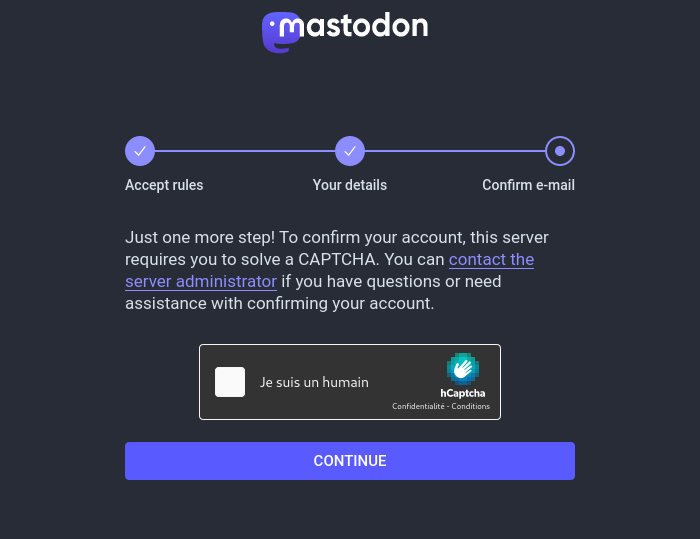
对于某些人来说,使用中心化的验证码服务可能会引起安全和隐私方面的担忧。 此外,验证码可能会使注册过程的可访问性大大降低,尤其是对于视力障碍人士,如盲人或视力低下的人而言。

目前, hCaptcha 是 Mastodon 唯一支持的验证码提供商。 未来可能会添加其他提供商。

hCaptcha

  • 在 hcaptcha.com 创建一个免费的 hCaptcha 账户
  • 完成注册后,使用 hCaptcha 仪表板添加新站点,输入你的 Mastodon 站点域名并获取站点密钥(Site Key)
  • 从 hCaptcha 的账户设置菜单中获取你的密钥(Secret Key)
  • 将这些值添加到你的 Mastodon 环境配置中,分别添加 HCAPTCHA_SITE_KEY 和 HCAPTCHA_SECRET_KEY
  • 重启服务器上运行的 Mastodon 服务
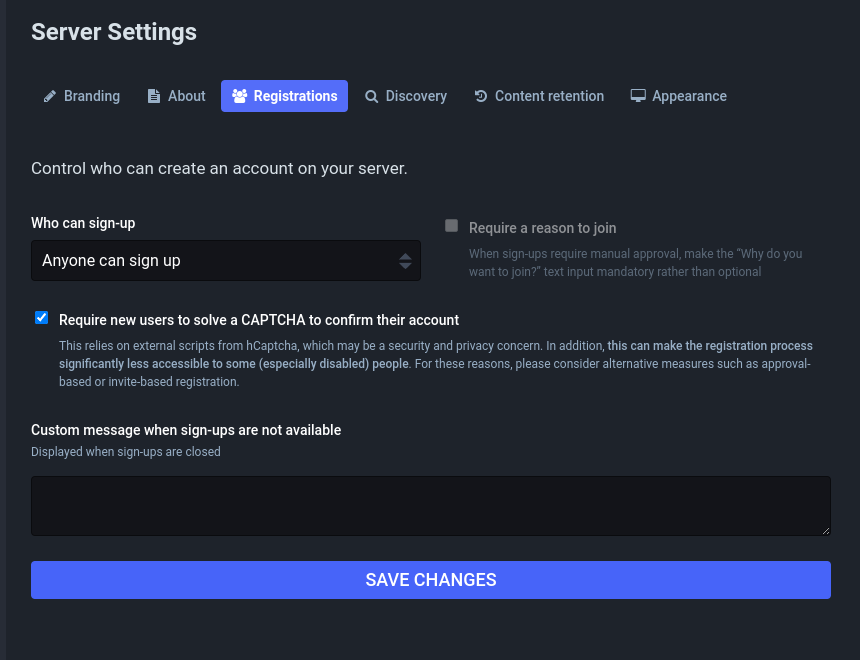
  • 从 Mastodon 网页界面导航至管理>服务器设置>注册,并勾选标有"要求新用户解决验证码以确认其账户"的选项
翻译状态: 本文是英文页面 Captcha 的翻译,最后翻译时间:2025-04-21,点击这里可以查看翻译后页面的改动。

最后更新于 April 21, 2025 · 改进此页面
也可在此找到: English

赞助商

Dotcom-Monitor LoadView Stephen Tures Swayable SponsorMotion

加入Mastodon · 博客 ·

查看源代码 · CC BY-SA 4.0 · 版权信息